Add a statement
Choose a digital PDF or a clear scan. All conversion happens on your device.
Your bank statement. Ready for the spreadsheet.
Convert a PDF, PNG or JPG bank statement to Excel or CSV, with five clear transaction columns.
Everything runs in your browser, so your statement is never uploaded. Less retyping. A clearer view of your money.
Tap to select a file, or drag it here
PDF, PNG or JPG · up to 10 MB · 5 PDF pagesSign in or create an account · One free successful conversion, no card required.
1. Save a synthetic sample to your device.
2. Choose that file above and convert it.
3. Download Excel or CSV and open the saved file.
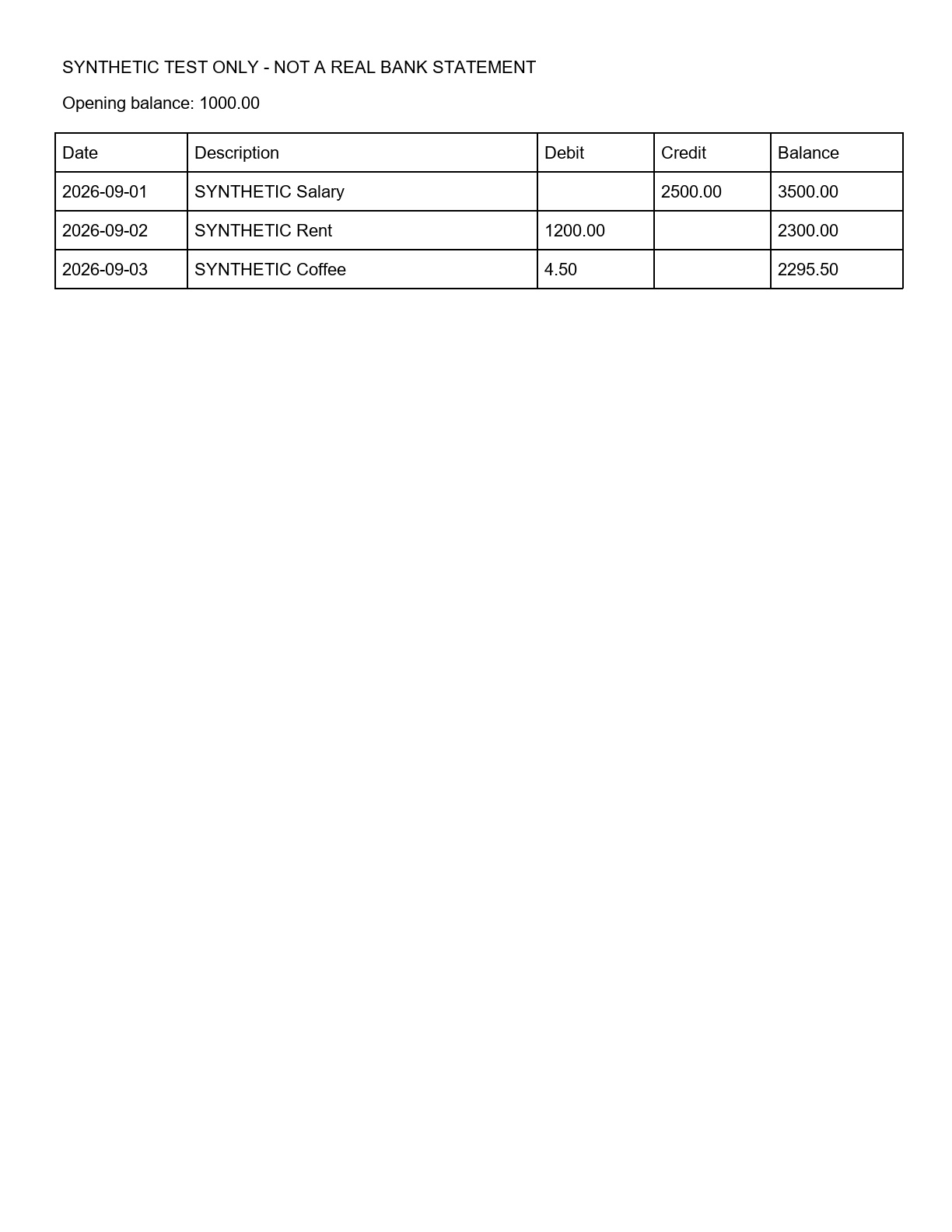
Expected result: 3 transactions; final balance 2,295.50. These samples contain no customer data. One successful conversion is free; further conversions use purchased pages.
Choose transaction pages to avoid exporting duplicate detail sections. Selecting pages creates a partial export.
Your file stays in this browser and is never uploaded.
Progress applies to the current step. First-time image recognition needs a download; keep this page open.
Choose a digital PDF or a clear scan. All conversion happens on your device.
See the extracted columns before downloading. Check dates, amounts and balances against the original.
Download an Excel workbook with numeric amounts, or a CSV for your next step.
This converter is tuned for English transaction tables with Date, Description, Debit, Credit and Balance columns. Other layouts may need manual work.
Try the converterText extraction for digital PDFs. On-device OCR for scanned PDFs and images.
Running-balance mismatches are flagged. Missing or ambiguous columns stop the export.
Password-protected files, unclear scans and unsupported column layouts are not silently guessed.
A statement is easy to read and awkward to reuse. Copying transactions from a PDF can mix descriptions with amounts, turn several columns into one, or leave you rebuilding a table by hand. BankStatementMate extracts supported transaction tables into Date, Description, Debit, Credit and Balance columns, so you can review the structure before saving a file.
Use the workbook to filter transactions, add your own notes, or prepare a reviewed table for someone else. The converter does not categorize spending, connect to a bank account, or decide which transactions belong in your books. It gives you an editable starting point and keeps the original statement as the reference.
Read the conversion & review guide ↗Excel output keeps the five headers and writes amounts as numeric cells, with two decimal places displayed. Blank debit or credit cells stay blank. Full dates use year-month-day text when their order is clear. Dates without a year retain the source text and trigger a review notice. Open the Transactions sheet, compare it with the source, then add filters, formulas or notes in your spreadsheet application.
Choose this when you want a readable workbook for checking and editing. The export is a transaction table, not a copy of the PDF's page design.
CSV contains the same transaction columns in a plain-text file. It is useful when another application asks for tabular data, but each destination has its own import rules. Check the expected column names, date format and debit/credit convention before importing.
This version does not generate QBO, OFX or a dedicated accounting-system import. Keep a reviewed copy of the export before changing its layout for another tool.
Read the preview against your PDF, including the first and last transactions. Check that money out is in Debit and money in is in Credit. A running-balance warning means a sequence needs attention; it is not permission to change a number until it fits.
For the included fictional sample, a 2,500.00 deposit takes the balance from 1,000.00 to 3,500.00. A 1,200.00 payment leaves 2,300.00, followed by a 4.50 payment leaving 2,295.50. The sample lets you inspect a known result before selecting your own file.
See the transaction review checklist ↗Turn supported statement files into five reviewable CSV columns for spreadsheet cleanup, reconciliation or your own import workflow.
Use local OCR for supported scanned PDFs and images, then review the recognized transaction rows before export.
Extract supported transaction tables into Date, Description, Debit, Credit and Balance without silently guessing unsupported layouts.
Follow the practical conversion and review checklist, including a known three-transaction sample result.
Working in a shared spreadsheet? Import reviewed bank statement transactions into Google Sheets →
No. The converter reads the file in your browser using local PDF extraction and OCR. Your account stores your email, page allowance and conversion status, but not statement files or extracted transactions. Use Remove file or close this page to clear the current result.
Clear English scans with readable transaction columns can be processed using local OCR. Unclear text or unsupported layouts will need manual review. A successful download is not a guarantee of financial accuracy.
Choose a PDF, PNG or JPG from your device, review the extracted table, then download Excel or CSV. Clear screenshots and scans can be read with OCR; blurry or unsupported layouts may fail. Word documents and HEIC photos are not supported. File selection and saving options depend on your mobile browser.
Upload, conversion, a transaction preview, and Excel or CSV download. Files are limited to 10 MB and five PDF pages for browser stability. These per-file limits apply to the free conversion and paid plans.
Compare every transaction with the original, including the debit and credit direction, dates, balances, and any missing rows. This tool prepares data; it does not provide accounting or tax advice.
Not yet. The current converter is designed for clear English tables with separate Date, Description, Debit, Credit and Balance headings. A single signed Amount column, unfamiliar date layout, or wrapped transaction description may be rejected. The available synthetic samples verify specific layouts, not universal bank coverage.
Stop and compare the affected rows with the original statement. Try a clearer source file if text is hard to read. If the structure is unsupported, use another conversion method or enter the affected data manually. A completed conversion cannot prove that every character was recognized correctly.
Sign in to use your free conversion or purchased pages. Statements stay on your device.
Before creating an account, read our Privacy Policy and Terms of Service.
Prices are in USD. Create and verify your account for one free successful conversion, with no card required. Choose a plan only after checking that your statement works.
$17.90 one-time
Allowance: 19 statement pages.
For an occasional set of statements. Unused pages expire 365 days after purchase.
Try the converter$35.90 / month
Allowance: 200 pages per month.
For regular statement conversion. Unused monthly pages do not roll over. Cancel renewal before your next billing date.
Try the converter$109.90 / year
Allowance: 400 pages per month.
Annual billing, with a monthly page allowance. This is not an unlimited plan.
Try the converterAll plans include: the same supported PDF, PNG and JPG conversion to Excel or CSV that you can test here. Current limits are 10 MB per file and 5 pages per PDF. Larger allowances do not mean larger files or support for every bank layout.
Your free trial is one successful conversion with a downloadable result; failed conversions do not consume the trial. Each image counts as one page; PDFs count selected pages. Repeated downloads of the same conversion do not use more pages. Subscription pages do not roll over. Monthly plans renew monthly and yearly plans renew annually until canceled. Manage or cancel renewal from your account.
Check a sample before choosing a plan. Review dates, descriptions, debit, credit and balance against your original statement. See our bank statement conversion guide for supported layouts and common limitations.
Questions about an order or a conversion? Email support@bankstatementmate.com. Include your order reference when relevant; do not email sensitive statements.